Local Email Testing Without Mailhog: Mailpit Setup Guide
Testing email functionality in development is a nightmare. You cannot send real emails (spam risk), external email APIs are slow, and that abandoned Mailhog project stopped working on your new Mac.
Enter Mailpit — a modern, actively maintained email testing tool that is faster, prettier, and actually works on Apple Silicon. And it is built right into FlyEnv.
The Mailhog Problem (And Why You Need an Alternative)
Mailhog was the go-to local email testing tool for years. But:
- Abandoned project — last meaningful update in 2021
- No Apple Silicon support — requires Rosetta on M1/M2/M3 Macs
- Memory leaks — consumes increasing RAM over time
- Clunky web interface — has not aged well
Mailpit is the modern replacement: same concept, better execution.
What Is Mailpit?
Mailpit is an email and SMTP testing tool with a fake SMTP server. It:
- Catches outgoing emails from your application
- Displays them in a web interface for preview
- Supports HTML rendering, attachment viewing, and API access
- Runs locally — nothing leaves your machine
Think of it as a "black hole" for development emails.
Mailpit vs Mailhog: Feature Comparison
| Feature | Mailhog (Legacy) | Mailpit |
|---|---|---|
| Active development | No | Yes |
| Apple Silicon | Emulated | Native ARM64 |
| Modern UI | Dated | Clean, responsive |
| HTML preview | Basic | Advanced with mobile view |
| Dark mode | No | Yes |
| API | Limited | REST API + WebSocket |
| Message persistence | In-memory only | SQLite/Database |
| SMTP relay | No | Forward to real SMTP |
Setting Up Mailpit in FlyEnv
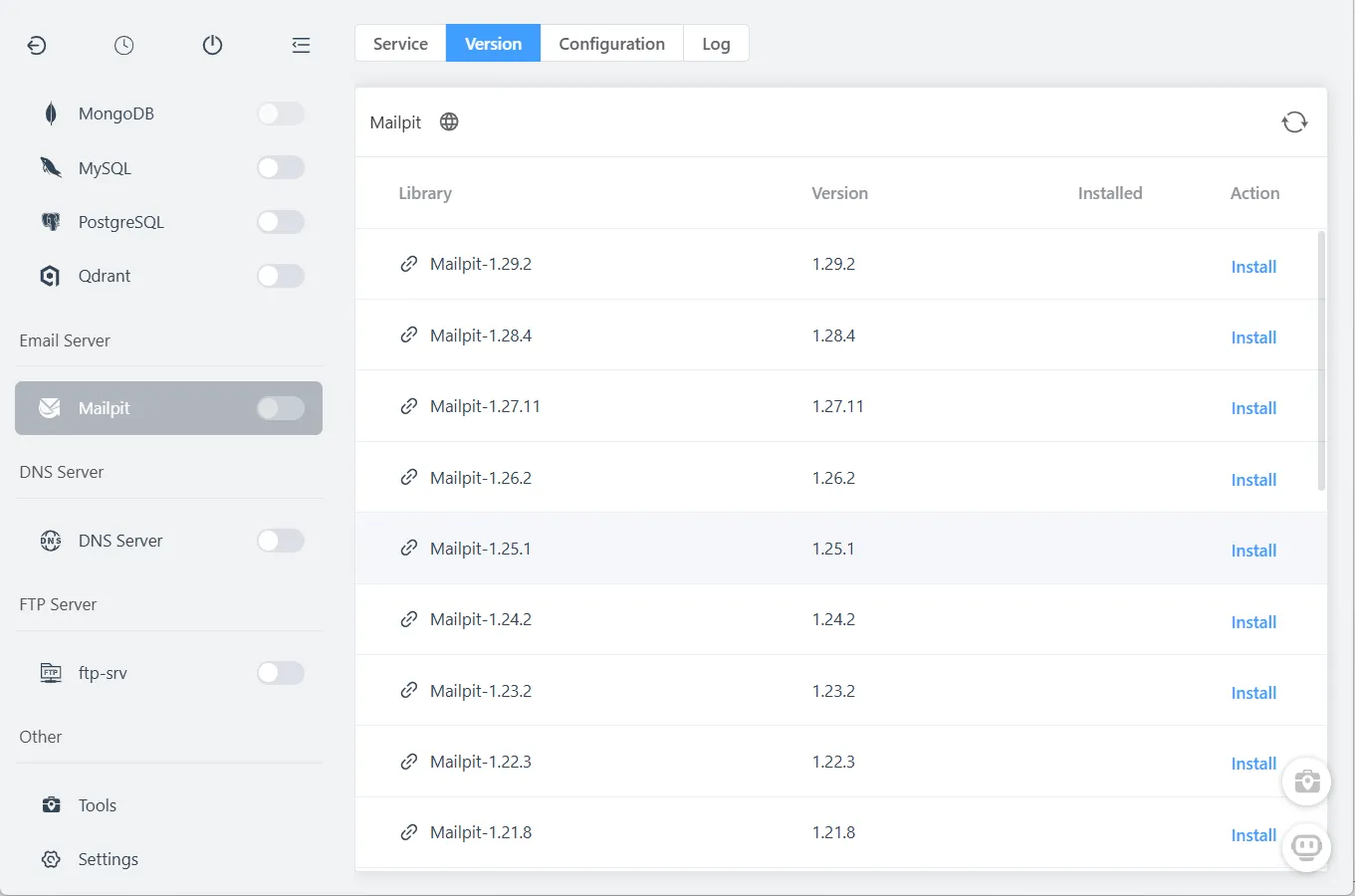
Step 1: Install Mailpit
FlyEnv makes this trivial:
- Open FlyEnv -> Mailpit module
- Select version (latest recommended)
- Click Install
Step 2: Configure Your Application
Point your app's SMTP settings to Mailpit:
For PHP (Laravel/Symfony/WordPress):
MAIL_MAILER=smtp
MAIL_HOST=127.0.0.1
MAIL_PORT=1025
MAIL_USERNAME=null
MAIL_PASSWORD=null
MAIL_ENCRYPTION=null
For Node.js (Nodemailer):
const transporter = nodemailer.createTransport({
  host: '127.0.0.1',
  port: 1025,
  secure: false
});
For Python (Django):
EMAIL_BACKEND = 'django.core.mail.backends.smtp.EmailBackend'
EMAIL_HOST = '127.0.0.1'
EMAIL_PORT = 1025
For Ruby on Rails:
config.action_mailer.delivery_method = :smtp
config.action_mailer.smtp_settings = {
  address: '127.0.0.1',
  port: 1025
}
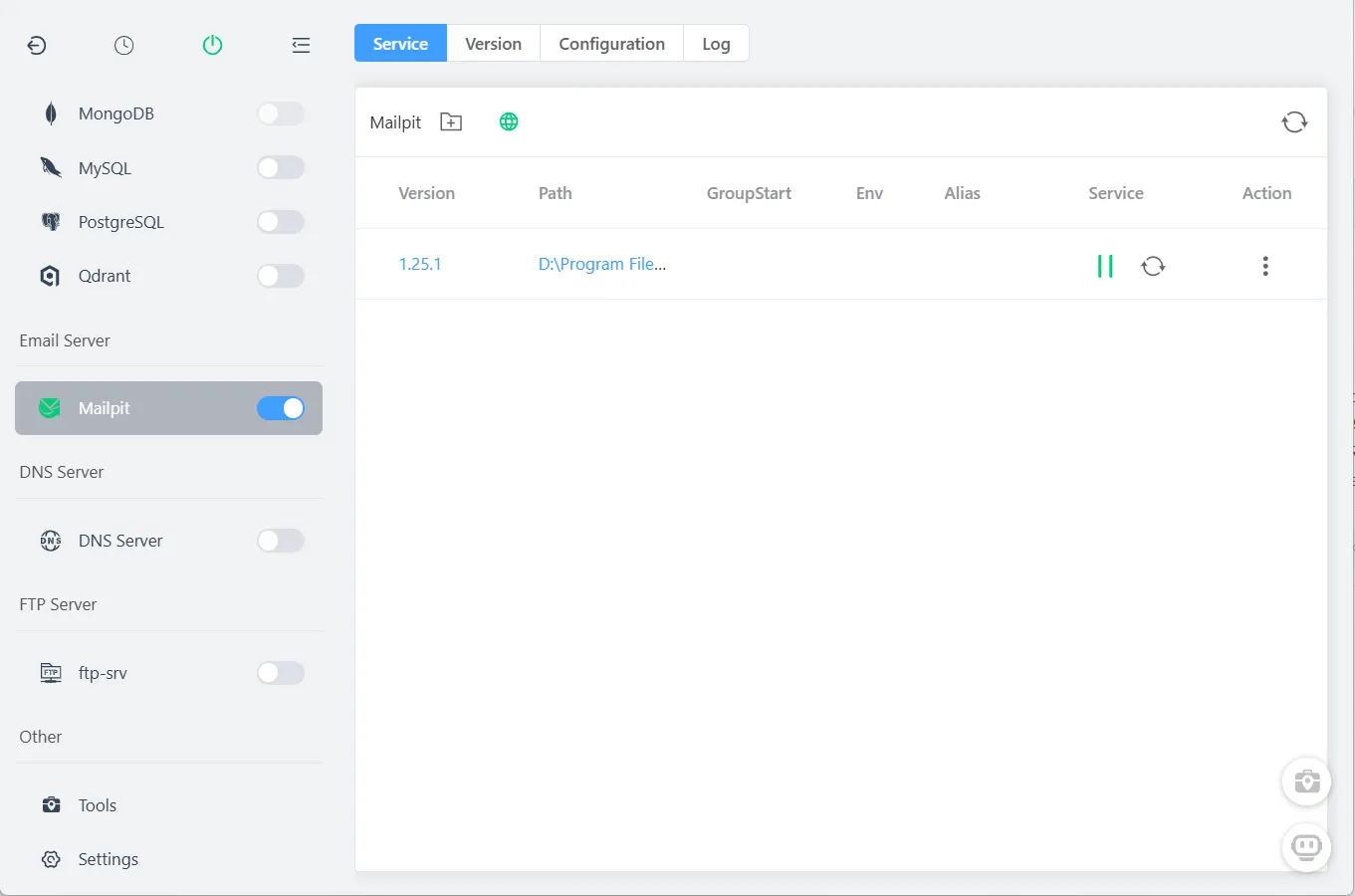
Step 3: Start Mailpit Service
In FlyEnv's Mailpit module, click the start button.
Default access points:
- SMTP Server: 127.0.0.1:1025 (catches emails)
- Web Interface: http://127.0.0.1:8025 (view emails)
Step 4: Test Email Capture
Send a test email from your application. Open http://127.0.0.1:8025 to view captured messages.
Using Mailpit for Email Testing
HTML Email Preview
Click any message to see:
- HTML preview — rendered exactly as recipients see it
- Plain text view — fallback content
- Source view — raw email headers and body
- Mobile preview — responsive testing
Attachment Handling
Mailpit displays attachments inline:
- Images rendered as thumbnails
- PDFs, documents available for download
- Size limits configurable
API Access
Automate email testing in your test suite:
// Example: Checking email was sent
const waitForEmail = async () => {
  const response = await fetch('http://127.0.0.1:8025/api/v1/messages');
  const data = await response.json();
  return data.messages.find(m => m.To[0].Address === '[email protected]');
};
Advanced Features
Message Relay
Need to actually receive an email? Configure relay in FlyEnv settings to forward specific emails to real SMTP servers.
Message Persistence
Unlike Mailhog's in-memory storage, Mailpit uses SQLite by default:
- Emails survive restarts
- Configure retention policies
- Export message history
Integration with Popular Frameworks
Laravel
Ensure .env points to Mailpit:
MAIL_HOST=127.0.0.1
MAIL_PORT=1025
WordPress
Add to wp-config.php or a plugin:
add_action('phpmailer_init', function($phpmailer) {
    $phpmailer->isSMTP();
    $phpmailer->Host = '127.0.0.1';
    $phpmailer->Port = 1025;
    $phpmailer->SMTPAuth = false;
});
Symfony
framework:
    mailer:
        dsn: 'smtp://127.0.0.1:1025'
Troubleshooting
Connection refused errors
- Verify Mailpit is running in FlyEnv
- Check port 1025 is not used by another service
- Ensure firewall allows localhost connections
Emails not appearing
- Verify SMTP settings in your application
- Check Mailpit logs for connection attempts
- Ensure correct port (1025 for SMTP, not 8025)
Frequently Asked Questions (FAQ)
Q: Is Mailpit free?
A: Yes. Completely free and open-source, just like Mailhog—but actively maintained.
Q: Does it work on Windows?
A: Absolutely. FlyEnv provides native Windows binaries alongside macOS and Linux support.
Q: Can I forward emails to my real inbox?
A: Yes. Mailpit supports SMTP relay to forward specific emails to real addresses.
Q: How long are emails stored?
A: By default, Mailpit persists to SQLite indefinitely. Configure retention in settings.
Q: Does it support attachments?
A: Yes. Images, PDFs, documents—all previewable and downloadable.
Q: Can I use this for load testing?
A: Yes. Mailpit handles high volumes better than Mailhog ever did.
Ready to Upgrade Your Email Testing?
Stop fighting with abandoned software. Mailpit in FlyEnv gives you modern, reliable email testing that just works.
Download FlyEnv to get started with built-in Mailpit support.
Explore more development tools in our AI & Productivity Tools section.